
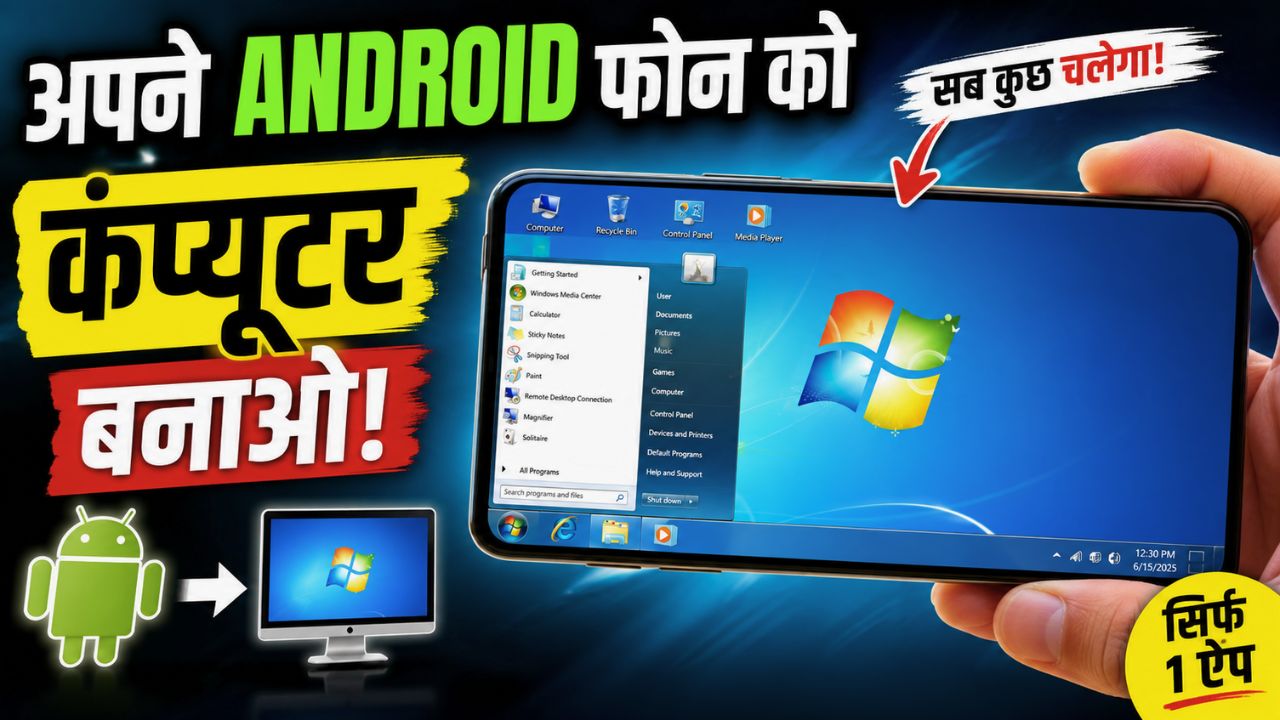
Have you ever wanted to see Windows 7 running on your phone? Not just a wallpaper or a normal theme, but an actual Windows 7-style desktop with folders, settings, apps, and that old computer feeling?
There is an Android app called Win7 Simu that does something pretty interesting. It brings a Windows 7-style desktop experience to your smartphone.
You can open the app and get a familiar desktop interface, complete with a Start menu, folders, Control Panel, Paint, Calculator, and other features that make the phone feel a bit like an old Windows computer.
It is not a real Windows operating system and it does not turn your Android phone into a full PC. It is a simulator made mainly for the experience, fun, and a bit of nostalgia. Still, if you grew up using Windows 7, this app can be surprisingly fun to play with.
What Is Win7 Simu?
Win7 Simu is a Windows 7 simulator developed by Visnalize. The app is available on Android, and there is also a Windows version listed on Google Play Games for PC.
The Android version has already crossed 10 million downloads on Google Play and has a 4.0-star rating based on more than 80,000 reviews. The app also contains ads and offers in-app purchases.
The main idea is simple. Open the app and your phone gets a Windows 7-style desktop interface. You can interact with different parts of the simulated system and explore the old-school desktop experience directly from your phone.
And yes, it looks quite different from the usual Android home screen.
How Does Win7 Simu Work?
After opening Win7 Simu, you get a simulated Windows desktop instead of the normal Android-style interface. It is designed to look and feel like the classic Windows 7 environment, so things like the desktop, Start menu, folders, and system settings have a familiar look.
The app description says it includes 30+ themes, which gives you different ways to customize the simulated desktop.
You can spend time exploring the different sections and trying out the built-in features. It is especially fun if you remember using an old Windows 7 computer and want to bring some of that look back to your phone.
Is Win7 Simu a Real Windows Emulator?
No, and this is something worth knowing before downloading it.
Win7 Simu is a simulator, not a full Windows 7 installation. Your phone is still running Android underneath. The app simply creates a Windows 7-like environment inside the app.
This means you should not expect to install normal Windows desktop programs and use your phone exactly like a Windows PC.
In fact, the developer has also clarified in a Google Play review response that the app is not a launcher and cannot open mobile apps on the simulated desktop side.
So if your goal is to run full desktop versions of Windows software on Android, this is not the app for that.
What Can You Do Inside Win7 Simu?
The interesting part is all the small details inside the simulation. It is not just a picture of Windows 7 sitting on your screen.
The app includes different simulated tools and system features that you can open and interact with. Some of these include Paint, Calculator, Control Panel, folders, and other parts of the Windows-style interface.
The app has also received updates that add more features. For example, the latest update information shown on Google Play mentions an improved Calculator, Backup & Restore inside Control Panel, new Paint color editing features, an Android A: drive under Devices with Removable Storage, and improvements for handling large files.
That makes the app more interesting than simply installing a Windows-looking wallpaper on your phone.
You Can Even Try Different Windows Themes
One of the fun things about the app is its collection of themes.
The Google Play description says Win7 Simu comes with more than 30 themes. So if you don’t like the default look, you can try different styles and change the way the simulated desktop looks.
This is probably one of the reasons the app works so well for people who enjoy customization and old computer nostalgia.
What About Paint and Calculator?
Win7 Simu includes simulated versions of some familiar Windows tools.
Paint is one of them. Recent updates have added an Edit Colours feature to Paint, while the Calculator has also received more advanced features.
These are small things, but they make the simulated desktop feel more complete.
If you remember opening Paint on an old Windows 7 PC just to draw something random, you will probably understand the appeal.
Does Win7 Simu Let You Open Android Apps From the Windows Desktop?
No.
This is probably one of the most important things to understand.
Win7 Simu does not work like a Windows-style Android launcher where you can put all your phone apps inside a Windows desktop and launch them from there.
A developer response on Google Play specifically says that the app is not a launcher and cannot open mobile apps on the desktop side.
So if you install the app thinking that WhatsApp, Chrome, Instagram, or other Android apps will suddenly run inside a Windows 7 desktop, that is not what it is made for.
It is mainly about simulating the Windows experience.
Can You Use Win7 Simu on a Windows PC?
There is also a Windows version listed through Google Play Games on PC.
The Google Play listing says the game can be played on a Windows PC through Google Play Games. The listed minimum requirements include Windows 10 version 2004, an SSD with 10GB of available storage, 8GB RAM, a processor with four physical CPU cores, and compatible graphics such as Intel UHD Graphics 630 or similar. Hardware virtualization also needs to be enabled.
So the app is not limited to Android phones.
However, the main attraction for many people will probably be trying the Windows 7 experience on a smartphone.
Win7 Simu Features at a Glance
| Feature | Details |
|---|---|
| App Name | Win7 Simu |
| Developer | Visnalize |
| Platform | Android and Windows |
| Android Downloads | 10M+ |
| Google Play Rating | 4.0 stars |
| Themes | 30+ |
| Ads | Yes |
| In-App Purchases | Yes |
| Windows Support | Available through Google Play Games on PC |
| Main Purpose | Windows 7-style simulation |
Is Win7 Simu Safe to Use?
The Google Play listing includes a Data Safety section where the developer says that no data is shared with third parties and no data is collected. It also states that data is encrypted in transit and that users can request deletion of data.
These are developer-provided disclosures shown on Google Play, so it is still a good idea to check the app’s current Data Safety information before installing, especially because these details can change with future updates.
Why Do People Like This App?
The biggest reason is probably nostalgia.
Windows 7 was a very familiar operating system for a lot of people. The Start menu, desktop icons, folders, Control Panel, Paint, and the overall interface have a very different feeling compared to today’s smartphones.
Win7 Simu brings some of that experience to a phone without requiring an old computer.
It can also be fun if you simply like trying unusual Android apps. Instead of another wallpaper app or normal launcher, you get something that actually lets you explore a simulated desktop.
One Google Play reviewer even mentioned enjoying the way the app replicates Windows 7 because they used to have a Windows 7 desktop.
Things You Should Know Before Installing Win7 Simu
There are a few things that can save you from having the wrong expectations.
First, this is not a full Windows operating system. You are not replacing Android with Windows 7.
Second, it is not an Android launcher. Your Android apps will not suddenly become Windows desktop programs.
Third, some users have reported issues or requested improvements through Google Play reviews. For example, one reviewer mentioned limitations with the simulated Chrome browser and adding custom fonts in the simulated Microsoft Word environment. These are user experiences, so they may not happen on every device.
The developer also responded to a user asking about opening Android apps from the desktop, explaining that Win7 Simu is not a launcher.
How to Get Win7 Simu on Your Phone
If you want to try the app, you can find Win7 Simu by Visnalize on Google Play.
Search for:
Win7 Simu
Make sure you select the app from Visnalize, since that is the developer listed for the app.
Once installed, open it and start exploring the simulated Windows 7 desktop. You can check the Start menu, open different simulated tools, try the available themes, and see how closely it reminds you of the old Windows experience.
Is Win7 Simu Worth Trying?
If you are expecting your Android phone to become a real Windows computer, then probably not. This app cannot replace a Windows PC and it is not designed to run normal Windows software.
But if you simply want to have a Windows 7-style desktop on your phone, it is a pretty interesting app to try.
The 30+ themes, simulated desktop, Paint, Calculator, Control Panel, and other features give you plenty of things to explore. And with more than 10 million downloads, it is clearly not some tiny unknown app that nobody is using.
For me, the biggest reason to install something like this would be the fun factor. You can open your phone and suddenly have that old Windows 7 desktop sitting there. It is not practical in the same way as a real PC, but it does not really need to be.
Sometimes an app is just fun because it does something different.
Final Thoughts
Win7 Simu is an interesting Android app for anyone who wants to experience the look and feel of Windows 7 on a smartphone. It gives you a simulated desktop with different themes and several built-in features, while still keeping your actual Android system underneath.
Just don’t confuse it with a real Windows emulator or launcher. It cannot turn your Android phone into a full Windows PC or let you run every Windows program.
If you are looking for a fun Windows 7 simulator, especially because you miss the old desktop days, Win7 Simu is definitely worth checking out.
And honestly, after opening it for the first time, you might spend more time playing around with the desktop than you expected.
Frequently Asked Questions
Can Win7 Simu turn an Android phone into a Windows PC?
No. Win7 Simu creates a Windows 7-style simulated environment on Android. It does not replace Android with Windows or turn the phone into a full Windows computer.
Is Win7 Simu a launcher?
No. The developer has specifically stated that Win7 Simu is not a launcher and cannot open Android mobile apps from the simulated desktop.
Is Win7 Simu free?
The Google Play listing shows the app with ads and in-app purchases.
Can I use Win7 Simu on Windows?
Yes. A Windows version is listed through Google Play Games on PC, subject to the required PC specifications.
Who should try Win7 Simu?
It is mainly for people who enjoy Windows 7, desktop simulations, customization, or nostalgia. It is also a fun app to try if you want something different from the usual Android apps.

![How to reduce battery drain after [AndroidiOS version] update](https://unifite.in/wp-content/uploads/2026/10/How-to-reduce-battery-drain-after-AndroidiOS-version-update-218x150.jpg "How to Reduce Battery Drain After an Android or iOS Update (2026)")






[…] your Windows 11 PC running slowly, taking too long to start, or draining your laptop battery faster than usual? […]